plenoptic.Metamer#
- class plenoptic.Metamer(image, model, loss_function=<function mse>, penalty_function=<function penalize_range>, penalty_lambda=0.1)[source]#
Synthesize metamers for image-computable differentiable models.
Following the basic idea in [1], this class creates a metamer for a given model on a given image. We iteratively adjust the pixel values so as to match the representation of the
metamerandimage.- Parameters:
image (
Tensor) – A tensor, this is the image whose representation we wish to match.model (
Module) – A visual model.loss_function (
Callable[[Tensor,Tensor],Tensor] (default:<function mse at 0x7f41412b0cc0>)) – The loss function used to compare the representations of the models in order to determine their loss.penalty_function (
Callable[[Tensor],Tensor] (default:<function penalize_range at 0x7f41412b2160>)) – A function applied to the metamer during optimization, that returns a scalar penalty to be minimized. By penalizing certain properties of the image, like pixels values outside an allowed range, we can constrain those image properties. See Regularization penalty in the documentation for details and examples.penalty_lambda (
float(default:0.1)) – Weight of the penalty term. Must be non-negative.
References
Examples
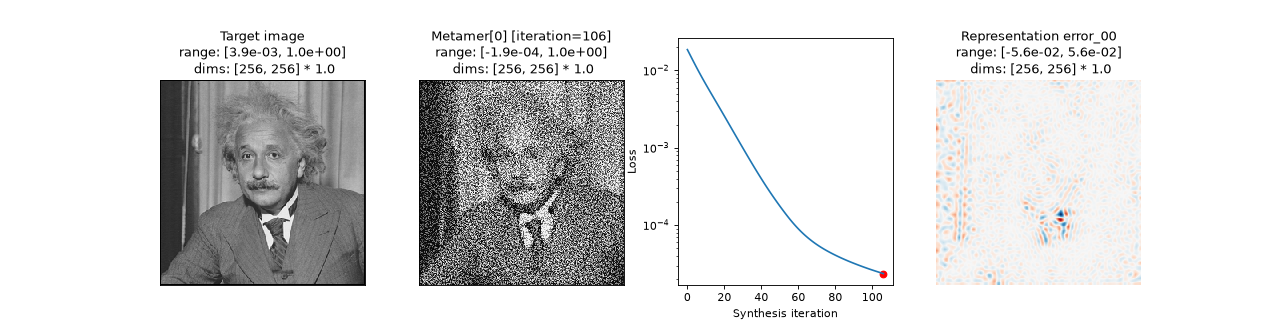
Synthesize and visualize a metamer for a simple model:
>>> import plenoptic as po
>>> import matplotlib.pyplot as plt
>>> img = po.data.einstein()
>>> model = po.models.Gaussian(30).eval()
>>> po.remove_grad(model)
>>> met = po.Metamer(img, model)
>>> met.synthesize(110)
>>> fig, axes = plt.subplots(1, 4, figsize=(16, 4))
>>> po.plot.imshow(img, ax=axes[0], title="Target image")
<Figure size ... with 4 Axes>
>>> axes[0].xaxis.set_visible(False)
>>> axes[0].yaxis.set_visible(False)
>>> po.plot.synthesis_status(met, fig=fig, axes_idx={"misc": 0})
<Figure size ...>
Methods
get_progress(iteration[, iteration_selection])Return dictionary summarizing synthesis progress at
iteration.load(file_path[, map_location, ...])Load all relevant stuff from a .pt file.
objective_function([metamer, ...])Compute the metamer synthesis loss.
save(file_path)Save all relevant variables in .pt file.
setup([initial_image, optimizer, ...])Initialize the metamer, optimizer, and scheduler.
synthesize([max_iter, store_progress, ...])Synthesize a metamer.
to(*args, **kwargs)Move and/or cast the parameters and buffers.
Attributes
Optimization gradient's L2 norm over iterations.
Target image of metamer optimization.
Callable which specifies how close metamer representation is to target.
Optimization loss over iterations.
Model metamer, the parameter we are optimizing.
The model for which the metamer is synthesized.
Torch optimizer object which updates the synthesis target.
Penalty function output over iterations.
Callable which penalizes additional properties of the synthesized image.
Magnitude of the regularization weight.
L2 norm change in pixel values over iterations.
metamer, cached over time for later examination.Learning rate scheduler which adjusts optimizer learning rate.
How often we are caching progress.
- get_progress(iteration, iteration_selection='round')[source]#
Return dictionary summarizing synthesis progress at
iteration.This returns a dictionary containing info from
losses,pixel_change_norm,gradient_norm,penalties, andsaved_metamercorresponding toiteration. If synthesis was run withstore_progress=False(and so we did not cache anything insaved_metamer), then that key will be missing. If synthesis was run withstore_progress>1, we will grab the corresponding tensor fromsaved_metamer, with behavior determined byiteration_selection.The returned dictionary will additionally contain the keys:
"iteration": the (0-indexed positive) synthesis iteration that the values forlosses,pixel_change_norm,penalties, andgradient_normcome from.If
self.store_progress,"store_progress_iteration": the (0-indexed positive) synthesis iteration that the value forsaved_metamercomes from.
Note that for the most recent iteration (
iteration=-1oriteration=Noneoriteration==len(self.losses)-1), we do not have values forpixel_change_normorgradient_norm, since in this case we are showing the loss and value for the current metamer.- Parameters:
iteration (
int|None) – Synthesis iteration to summarize. IfNone, grab the most recent. Negative values are allowed.iteration_selection (
Literal['floor','ceiling','round'] (default:'round')) –How to select the relevant iteration from
saved_metamerwhen the request iteration wasn’t stored.When synthesis was run with
store_progress=n(wheren>1), metamers are only saved everyniterations. If you request an iteration where a metamer wasn’t saved, this determines which available iteration is used instead:"floor": use the closest saved iteration before the requested one."ceiling": use the closest saved iteration after the requested one."round": use the closest saved iteration.
- Return type:
- Returns:
progress_info – Dictionary summarizing synthesis progress.
- Raises:
IndexError – If
iterationtakes an illegal value.- Warns:
UserWarning – If the iteration used for
saved_metameris not the same as the argumentiteration(because e.g., you setiteration=3butself.store_progress=2).
See also
synthesis_statusCreate a plot summarizing synthesis status at a given iteration.
synthesis_animateCreate a video of the metamer changing over the course of synthesis.
Examples
>>> import plenoptic as po
>>> po.set_seed(0)
>>> img = po.data.einstein()
>>> model = po.models.Gaussian(30).eval()
>>> po.remove_grad(model)
>>> met = po.Metamer(img, model)
>>> met.synthesize(5)
Get values from the first iteration:
>>> met.get_progress(0)
{'losses': tensor(0.0194),
'iteration': 0,
'penalties': tensor(0.),
'pixel_change_norm': tensor(2.5326),
'gradient_norm': tensor(0.0010)}
Get values from last iteration of synthesis:
>>> print(met.get_progress(-2))
{'losses': tensor(0.0145),
'iteration': 4,
'penalties': tensor(0.0180),
'pixel_change_norm': tensor(2.2698),
'gradient_norm': tensor(0.0268)}
Get current values:
>>> print(met.get_progress(-1))
{'losses': tensor(0.0132),
'iteration': 5,
'penalties': tensor(0.0174),
'pixel_change_norm': None,
'gradient_norm': None}
When synthesis is run with
store_progress=True, this function also returns the metamer from the corresponding iteration:>>> met = po.Metamer(img, model) >>> met.synthesize(5, store_progress=True) >>> print(met.get_progress(-1)) {'losses': tensor(0.0124), 'iteration': 5, 'penalties': tensor(0.0168), 'pixel_change_norm': None, 'gradient_norm': None, 'saved_metamer': tensor([[[[0.4554, ...]]]], grad_fn=<SelectBackward0>), 'store_progress_iteration': 5} >>> torch.equal(met.saved_metamer[-1], met.get_progress(-1)["saved_metamer"]) True
When synthesis is run with
store_progress>1, this function returns the metamer from the closest iteration:>>> met = po.Metamer(img, model) >>> met.synthesize(5, store_progress=2) >>> print(met.get_progress(-3)) {'losses': tensor(0.0152), 'iteration': 3, 'penalties': tensor(0.0182), 'pixel_change_norm': tensor(2.3592), 'gradient_norm': tensor(0.0269), 'saved_metamer': tensor([[[[0.8532, ...]]]], grad_fn=<SelectBackward0>), 'store_progress_iteration': 4}
When we cannot grab the saved metamer corresponding to the requested iteration,
iteration_selectioncontrols how we determine “closest”:>>> print(met.get_progress(-3, iteration_selection="floor")) {'losses': tensor(0.0152), 'iteration': 3, 'penalties': tensor(0.0182), 'pixel_change_norm': tensor(2.3592), 'gradient_norm': tensor(0.0269), 'saved_metamer': tensor([[[[ 0.8730, ...]]]], grad_fn=<SelectBackward0>), 'store_progress_iteration': 2}
- load(file_path, map_location=None, raise_on_checks=True, tensor_equality_atol=1e-08, tensor_equality_rtol=1e-05, **pickle_load_args)[source]#
Load all relevant stuff from a .pt file.
This should be called by an initialized
Metamerobject – we will ensure thatimage,target_representation(and thusmodel), andloss_functionare all identical.Note this operates in place and so doesn’t return anything.
Changed in version 1.2: load behavior changed in a backwards-incompatible manner in order to compatible with breaking changes in torch 2.6.
Changed in version 2.0.0: Adds
raise_on_checksargument.- Parameters:
file_path (
str) – The path to load the synthesis object from.map_location (
str|None(default:None)) – Argument to pass totorch.loadasmap_location. If you save stuff that was being run on a GPU and are loading onto a CPU, you’ll need this to make sure everything lines up properly. This should be structured like the str you would pass totorch.device.raise_on_checks (
bool(default:True)) – During load, we perform several checks to ensure that the saved object was initialized in the same way as the loading object. This is to ensure that the model, image, etc. are all the same and avoid unpleasant surprises. IfTrue, we raise aValueErrorif any of these checks fail. IfFalse, we instead raise aLoadWarning. The intended use here is if you’re loading something that was saved with an older version of plenoptic and you’re sure that you’re doing everything correctly. Note that different devices or dtypes will always result in aValueError. See raise_on_checks on the “Reproducibility and Compatibility” page of the documentation for more info. Additionally, note that, if theMetamerobject itself has changed, we cannot ensure that methods are the same – proceed at your own risk.tensor_equality_atol (
float(default:1e-08)) – Absolute tolerance to use when checking for tensor equality during load, passed totorch.allclose. It may be necessary to increase if you are saving and loading on two machines with torch built by different cuda versions. Be careful when changing this! Seetorch.finfofor more details about floating point precision of different data types (especially,eps); if you have to increase this by more than 1 or 2 decades, then you are probably not dealing with a numerical issue.tensor_equality_rtol (
float(default:1e-05)) – Relative tolerance to use when checking for tensor equality during load, passed totorch.allclose. It may be necessary to increase if you are saving and loading on two machines with torch built by different cuda versions. Be careful when changing this! Seetorch.finfofor more details about floating point precision of different data types (especially,eps); if you have to increase this by more than 1 or 2 decades, then you are probably not dealing with a numerical issue.**pickle_load_args (
Any) – Any additional kwargs will be added topickle_module.loadviatorch.load, see that function’s docstring for details.
- Raises:
ValueError – If
setuporsynthesizehas been called before this call toload.ValueError – If the object saved at
file_pathis not aMetamerobject.ValueError – If the saved and loading
Metamerobjects have a different value for any ofimageorpenalty_lambda,ValueError – If the behavior of
loss_functionormodelis different between the saved and loading objects.
- Warns:
UserWarning – If
setupwill need to be called after load, to finish initializingoptimizerorscheduler.
See also
examine_saved_synthesisExamine metadata from saved object: pytorch and plenoptic versions, name of the synthesis object, shapes of tensors, etc.
Examples
In order to load a saved
Metamerobject, we must first initialize one using the same arguments. (We use float64 / “double” precision rather than torch’s default float32 because it increases reproducibility, see the Reproducibility page of our documentations for more details.) Here, we load in a cached example:>>> import plenoptic as po >>> img = po.data.einstein().to(torch.float64) >>> model = po.models.Gaussian(30).eval().to(torch.float64) >>> po.remove_grad(model) >>> met = po.Metamer(img, model) >>> print(met.metamer) tensor([]) >>> met.load(po.data.fetch_data("example_metamer_gaussian.pt")) >>> print(met.metamer) tensor([[[[0.0692, ...]]]], dtype=torch.float64, requires_grad=True)
If the saved
Metamerobject lived on a CUDA device and you do not have CUDA on the loading machine, usemap_locationto change device:>>> met = po.Metamer(img, model) >>> met.image.device device(type='cpu') >>> met.load(po.data.fetch_data("example_metamer_gaussian-cuda.pt")) Traceback (most recent call last): RuntimeError: Attempting to deserialize object on a CUDA device but torch.cuda.is_available() is False... >>> met.load( ... po.data.fetch_data("example_metamer_gaussian-cuda.pt"), ... map_location="cpu", ... ) >>> print(met.metamer) tensor([[[[0.0692, ...]]]], dtype=torch.float64, requires_grad=True)
If the loading
Metamerobject was not initialized with same values as the saved object, an error will be raised:>>> met = po.Metamer(torch.rand_like(img), model) >>> met.load(po.data.fetch_data("example_metamer_gaussian.pt")) Traceback (most recent call last): ValueError: Saved and initialized attribute image have different values...
If the loading
Metamerobject has a different data type than the saved object, an error will be raised:>>> met = po.Metamer(img, model) >>> met.to(torch.float32) >>> met.load(po.data.fetch_data("example_metamer_gaussian.pt")) Traceback (most recent call last): ValueError: Saved and initialized attribute image have different dtype...
- objective_function(metamer=None, target_representation=None, **analyze_kwargs)[source]#
Compute the metamer synthesis loss.
This calls
loss_functiononself.model(metamer, **analyze_kwargs)andtarget_representationand then addspenalty_lambdatimespenalty_functiononmetamer.Its output over time is stored in
losses.- Parameters:
- Return type:
- Returns:
loss – 1-element tensor containing the loss on this step.
Examples
>>> import plenoptic as po
>>> po.set_seed(0)
>>> img = po.data.einstein()
>>> model = po.models.Gaussian(30).eval()
>>> po.remove_grad(model)
>>> met = po.Metamer(img, model)
Before
setuporsynthesizeis called, this returns an empty tensor because the metamer attribute hasn’t been initialized:>>> met.objective_function() tensor([]) >>> met.synthesize(5, store_progress=True)
When called without any arguments, this returns the current loss:
>>> met.objective_function()
tensor(0.0132, grad_fn=<AddBackward0>)
>>> met.losses[-1]
tensor(0.0132)
Can be called with a different image. (Note that, because we called
synthesizewithstore_progress=True, we cached the metamer over the course of synthesis):>>> met.objective_function(met.saved_metamer[0]) tensor(0.0194, grad_fn=<AddBackward0>) >>> met.losses[0] tensor(0.0194)
This method differs from the
loss_functionattribute because of its inclusion of the penalty. In the following block, the pixels ofrand_imgall lie within [0, 1], and so the outputs ofobjective_functionandloss_functionare the same:>>> rand_img = torch.rand_like(img) >>> rand_img.min(), rand_img.max() (tensor(7.9870e-06), tensor(1.0000)) >>> met.objective_function(rand_img) tensor(0.0190) >>> met.loss_function(model(img), model(rand_img)) tensor(0.0190)
In this block, the image’s lie outside [0, 1], and so the outputs of
objective_functionandloss_functionare different:>>> rand_img *= 2 >>> rand_img.min(), rand_img.max() (tensor(0.0001), tensor(2.0000)) >>> met.objective_function(rand_img) tensor(1100.9663) >>> loss = met.loss_function(model(img), model(rand_img)) >>> loss tensor(0.3133)
To compute the output of the objective function, we take the output of
loss_functionand add the output ofpenalty_functiontimespenalty_lambda:>>> penalty = met.penalty_function(rand_img) >>> penalty tensor(11006.5293) >>> loss + met.penalty_lambda * penalty tensor(1100.9663)
- save(file_path)[source]#
Save all relevant variables in .pt file.
Note that if
store_progressis True, this will probably be very large.- Parameters:
file_path (
str) – The path to save the metamer object to.
See also
loadMethod to load in saved
Metamerobjects.
Examples
>>> import plenoptic as po
>>> img = po.data.einstein()
>>> model = po.models.Gaussian(30).eval()
>>> po.remove_grad(model)
>>> met = po.Metamer(img, model)
>>> met.synthesize(max_iter=5, store_progress=True)
>>> met.save("metamers.pt")
- setup(initial_image=None, optimizer=None, optimizer_kwargs=None, scheduler=None, scheduler_kwargs=None)[source]#
Initialize the metamer, optimizer, and scheduler.
Can only be called once. If
load()has been called,initial_imagemust beNone.- Parameters:
initial_image (
Tensor|None(default:None)) – The tensor we use to initialize the metamer. IfNone, we initialize with random noise uniformly-distributed in [0,1].optimizer (
Optimizer|None(default:None)) – The un-initialized optimizer object to use. IfNone, we usetorch.optim.Adam.optimizer_kwargs (
dict|None(default:None)) – The keyword arguments to pass to the optimizer on initialization. IfNone, we use{"lr": .01}and, if optimizer isNone,{"amsgrad": True}.scheduler (
LRScheduler|None(default:None)) – The un-initialized learning rate scheduler object to use. IfNone, we don’t use one.scheduler_kwargs (
dict|None(default:None)) – The keyword arguments to pass to the scheduler on initialization.
- Raises:
ValueError – If you try to set
initial_imageafter callingload.ValueError – If
setupis called more than once or aftersynthesize.ValueError – If you try to set
optimizer_kwargsafter callingload.TypeError – If the loaded object had a non-Adam optimizer, but the
optimizerarg is not specified.ValueError – If the loaded object had an optimizer, and the
optimizerarg is a different type.ValueError – If you try to set
scheduler_kwargsafter callingload.TypeError – If the loaded object had a scheduler, but the
schedulerarg is not specified.ValueError – If the loaded object had a scheduler, but the
schedulerarg is a different type.
- Warns:
UserWarning – If
initial_imageis a different shape thanself.image.
Examples
Set initial image:
>>> import plenoptic as po
>>> img = po.data.einstein()
>>> model = po.models.Gaussian(30).eval()
>>> po.remove_grad(model)
>>> met = po.Metamer(img, model)
>>> met.setup(po.data.curie())
Set optimizer:
>>> met = po.Metamer(img, model)
>>> met.setup(optimizer=torch.optim.SGD, optimizer_kwargs={"lr": 0.01})
Set optimizer and scheduler:
>>> met = po.Metamer(img, model)
>>> met.setup(
...     optimizer=torch.optim.SGD,
...     optimizer_kwargs={"lr": 0.01},
...     scheduler=torch.optim.lr_scheduler.ReduceLROnPlateau,
... )
Use with save/load. We only pass the optimizer/scheduler objects when calling setup after load, their kwargs and the initial image are handled during the load.
>>> met = po.Metamer(img, model)
>>> met.setup(
...     po.data.curie(),
...     optimizer=torch.optim.SGD,
...     optimizer_kwargs={"lr": 0.01},
...     scheduler=torch.optim.lr_scheduler.ReduceLROnPlateau,
... )
>>> met.synthesize(5)
>>> met.save("metamer_setup.pt")
>>> met = po.Metamer(img, model)
>>> met.load("metamer_setup.pt")
>>> met.setup(
...     optimizer=torch.optim.SGD,
...     scheduler=torch.optim.lr_scheduler.ReduceLROnPlateau,
... )
- synthesize(max_iter=100, store_progress=False, stop_criterion=0.0001, stop_iters_to_check=50)[source]#
Synthesize a metamer.
Update the pixels of
metameruntil its representation matches that ofimage.We run this until either we reach
max_iteror the loss changes less thanstop_criterionover the paststop_iters_to_checkiterations, whichever comes first.- Parameters:
max_iter (
int(default:100)) – The maximum number of iterations to run before we end synthesis (unless we hit the stop criterion).store_progress (
bool|int(default:False)) – Whether we should store the metamer image in progress during synthesis. IfFalse, we don’t save anything. If True, we save every iteration. If an int, we save everystore_progressiterations (note then that 0 is the same as False and 1 the same as True). This is primarily useful for usingsynthesis_animateto create a video of the course of synthesis.stop_criterion (
float(default:0.0001)) – If the loss over the paststop_iters_to_checkhas changed less thanstop_criterion, we terminate synthesis.stop_iters_to_check (
int(default:50)) – How many iterations back to check in order to see if the loss has stopped decreasing (forstop_criterion).
- Raises:
ValueError – If we find a NaN during optimization.
See also
synthesis_statusCreate a plot summarizing synthesis status at a given iteration.
synthesis_animateCreate a video of the metamer changing over the course of synthesis.
Examples
>>> import plenoptic as po
>>> po.set_seed(0)
>>> img = po.data.einstein()
>>> model = po.models.Gaussian(30).eval()
>>> po.remove_grad(model)
>>> met = po.Metamer(img, model)
>>> # this isn't enough to run synthesis to completion, just an example
>>> met.synthesize(5)
>>> met.losses
tensor([0.0194, 0.0198, 0.0179, 0.0160, 0.0145, 0.0132])
Synthesize a metamer, using
store_progressso we can examine progress later. (This also enables us to create a video of the metamer changing over the course of synthesis, seesynthesis_animate.)>>> met = po.Metamer(img, model) >>> # this isn't enough to run synthesis to completion, just an example >>> met.synthesize(5, store_progress=2) >>> met.saved_metamer.shape torch.Size([4, 1, 1, 256, 256]) >>> # see loss, etc on the 4th iteration >>> progress = met.get_progress(4) >>> progress.keys() dict_keys(['losses', ..., 'saved_metamer', 'store_progress_iteration']) >>> progress["losses"] tensor(0.0139)
Adjust
stop_criterionandstop_iters_to_checkto change how convergence is determined. In this case, we stop early by makingstop_criterionfairly large. In practice, you’re more likely to makestop_criterionsmaller to let synthesis run for longer.>>> met = po.Metamer(img, model) >>> # this isn't enough to run synthesis to completion, just an example >>> met.synthesize(12, stop_criterion=0.001, stop_iters_to_check=2) >>> len(met.losses) 9
- to(*args, **kwargs)[source]#
Move and/or cast the parameters and buffers.
This can be called as
to(device=None, dtype=None, non_blocking=False)
to(dtype, non_blocking=False)
to(tensor, non_blocking=False)
Its signature is similar to
torch.Tensor.to, but only accepts floating point desireddtype. In addition, this method will only cast the floating point parameters and buffers todtype(if given). The integral parameters and buffers will be moveddevice, if that is given, but with dtypes unchanged. When on_blocking` is set, it tries to convert/move asynchronously with respect to the host if possible, e.g., moving CPU Tensors with pinned memory to CUDA devices.See
torch.nn.Module.tofor examples.Note
This method modifies the module in-place.
- Parameters:
device (torch.device) – The desired device of the parameters and buffers in this module.
dtype (torch.dtype) – The desired floating point type of the floating point parameters and buffers in this module.
tensor (torch.Tensor) – Tensor whose dtype and device are the desired dtype and device for all parameters and buffers in this module.
Examples
>>> import plenoptic as po
>>> img = po.data.einstein()
>>> model = po.models.Gaussian(30).eval()
>>> po.remove_grad(model)
>>> met = po.Metamer(img, model)
>>> met.image.dtype
torch.float32
>>> met.model(met.image).dtype
torch.float32
>>> met.to(torch.float64)
>>> met.image.dtype
torch.float64
>>> met.model(met.image).dtype
torch.float64
- property loss_function: Callable[[Tensor, Tensor], Tensor]#
Callable which specifies how close metamer representation is to target.
- property losses: Tensor#
Optimization loss over iterations.
Will have
length=num_iter+1, wherenum_iteris the number of iterations of synthesis run so far.This tensor always lives on the CPU.
- property penalties: Tensor#
Penalty function output over iterations.
Will have
length=num_iter+1, wherenum_iteris the number of iterations of synthesis run so far.This tensor always lives on the CPU.
- property penalty_function: Callable[[Tensor], Tensor]#
Callable which penalizes additional properties of the synthesized image.
- property saved_metamer: Tensor#
metamer, cached over time for later examination.How often the metamer is cached is determined by the
store_progressargument to thesynthesizefunction.The last entry will always be the current
metamer.If
store_progress==1, then this corresponds directly tolosses:losses[i]is the error forsaved_metamer[i]This tensor always lives on the CPU, regardless of the device of the
Metamerobject.Examples
If synthesize is called without
store_progress, then this attribute just contains the metamer, though the number of dimensions is different:>>> import plenoptic as po >>> po.set_seed(0) >>> img = po.data.einstein() >>> model = po.models.Gaussian(30).eval() >>> po.remove_grad(model) >>> met = po.Metamer(img, model) >>> met.saved_metamer tensor([]) >>> met.synthesize(5) >>> met.saved_metamer tensor([[[[[ 0.0098, ...]]]]], grad_fn=<StackBackward0>) >>> met.metamer tensor([[[[ 0.0098, ...]]]], requires_grad=True) >>> met.saved_metamer.shape torch.Size([1, 1, 1, 256, 256]) >>> met.metamer.shape torch.Size([1, 1, 256, 256])
If synthesize is called with
store_progress=1, then this attribute contains the metamer at each iteration, andlosses[i]contains the error forsaved_metamer[i].>>> met = po.Metamer(img, model) >>> met.synthesize(5, store_progress=True) >>> met.saved_metamer.shape torch.Size([6, 1, 1, 256, 256]) >>> met.objective_function(met.saved_metamer[2]) tensor(0.0169, grad_fn=<AddBackward0>) >>> met.losses[2] tensor(0.0169)
(In the above example,
saved_metamerhas 6 elements because it includes the metamer at the start of each of the 5 synthesis iterations, plus the current one.)
- property scheduler: LRScheduler | None#
Learning rate scheduler which adjusts optimizer learning rate.
- property store_progress: bool | int#
How often we are caching progress.
If
False, we don’t save anything. IfTrue, we save every iteration. If an int, we save everystore_progressiterations (note then that 0 is the same asFalseand 1 the same asTrue).
- property target_representation: Tensor#
modelrepresentation ofimage.The goal of synthesis is for
model(metamer)to match this value.Examples
>>> import plenoptic as po
>>> img = po.data.einstein()
>>> model = po.models.Gaussian(30).eval()
>>> po.remove_grad(model)
>>> met = po.Metamer(img, model)
>>> torch.equal(model(img), met.target_representation)
True