plenoptic.process.rectangular_to_polar#
- plenoptic.process.rectangular_to_polar(x)[source]#
Rectangular to polar coordinate transform.
If input is real-valued,
amplitudewill be identical to the input andphasewill be all 0s.- Parameters:
x (
Tensor) – Complex tensor.- Return type:
- Returns:
amplitude – Tensor containing the amplitude (aka. complex modulus).
phase – Tensor containing the phase.
See also
rectangular_to_polar_dictSame operation on dictionaries.
polar_to_rectangularThe inverse operation.
local_gain_controlThe analogous function for real-valued signals.
Examples
>>> import plenoptic as po
>>> import torch
>>> x = torch.tensor([1 + 1j, 1 - 1j])
>>> amplitude, phase = po.process.rectangular_to_polar(x)
>>> amplitude
tensor([1.4142, 1.4142])
>>> phase
tensor([ 0.7854, -0.7854])
In plenoptic, this function is typically used for working with steerable pyramid coefficients:
>>> # starting from an image
>>> img = po.data.einstein()
>>> img.shape
torch.Size([1, 1, 256, 256])
>>> spyr = po.process.SteerablePyramidFreq(img.shape[-2:], is_complex=True)
>>> # let's only look at 1 scale and 1 orientation
>>> coeff = spyr(img)[0][:, :, 0]
>>> # the coefficients returned by spyr (forward) are in rectangular coordinates
>>> # so we can now use this function to get the polar coordinates
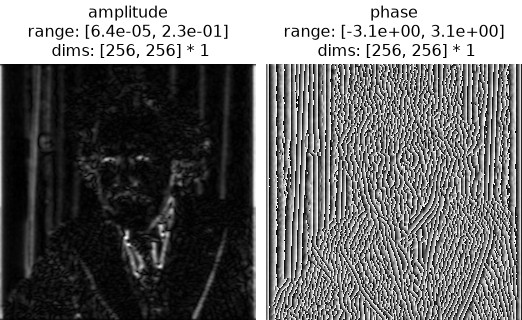
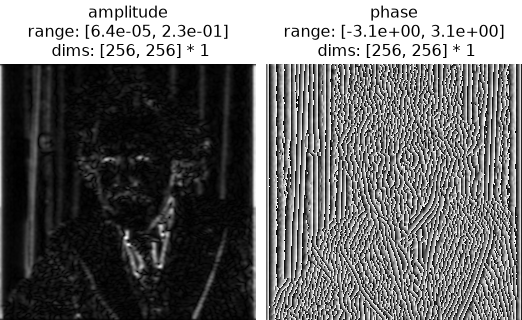
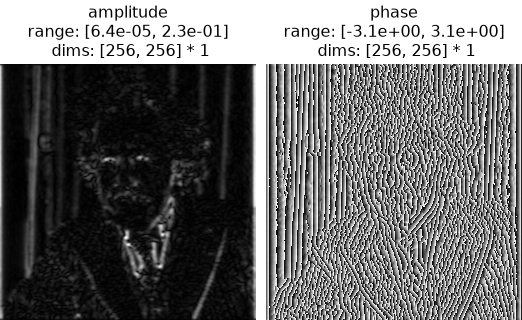
>>> amplitude, phase = po.process.rectangular_to_polar(coeff)
>>> amplitude.shape
torch.Size([1, 1, 256, 256])
>>> phase.shape
torch.Size([1, 1, 256, 256])
>>> # we can then invert the operation to verify that we get back the original
>>> rectangular_coeff = po.process.polar_to_rectangular(amplitude, phase)
>>> torch.allclose(coeff, rectangular_coeff)
True
>>> po.plot.imshow([amplitude, phase], title=["amplitude", "phase"])
<PyrFigure...>